
For this guide we tested and reviewed the platforms hands-on wherever a trial or demo was available, and verified each price against the vendor's own pricing page before publishing.
Square for Restaurants is the easiest on-ramp in restaurant POS: a genuine $0/month Free plan, flat published processing rates, and no long-term contract — the natural first pick for a café, food truck, or single-location quick service that wants to be taking orders this afternoon. The catch is depth: reporting and customization stay shallower than restaurant-native rivals, and you process every card through Square, with no option to bring your own payment processor. If you run a high-volume full-service floor that lives on configurable reports, you'll outgrow the Free plan fast and should price the Plus or Premium tier against a dedicated restaurant POS.
Square for Restaurants is a POS and payments platform — not a standalone reservations, accounting, or inventory product — though it bundles inventory tracking, online ordering, loyalty, and team tools on top of the register.
What Is Square for Restaurants #
Square for Restaurants is a cloud point-of-sale built on Square's payments ecosystem and tuned for food and beverage. The restaurant feature set — on-premise ordering, coursing, seat management, kitchen display, kiosk, online ordering, and menu management — is folded into Square's standard subscription tiers (Free, Plus, Premium) plus a custom enterprise tier called Square Pro.
It's made by Square, the commerce and seller brand of Block, Inc. (formerly Square, Inc.; renamed Block in December 2021; NYSE: XYZ), the same company behind Cash App. That matters because Square for Restaurants isn't a one-off restaurant product — it plugs into the wider Square stack for payments, embedded banking, payroll, and marketing, all under one login.
Square lists the food-and-beverage business types it targets right on the pricing page: coffee shops, quick service, drive-thru, full service, bars and breweries, food trucks, catering, bakeries, and pizzerias. The Free plan makes it a natural fit for cafés, food trucks, and new or low-volume operators; the paid Plus and Premium plans — with inventory tracking, coursing, and lower processing rates — reach toward full-service and multi-location restaurants; and Square Pro targets operators processing over $250,000 a year.
Features #
Point of sale and ordering #
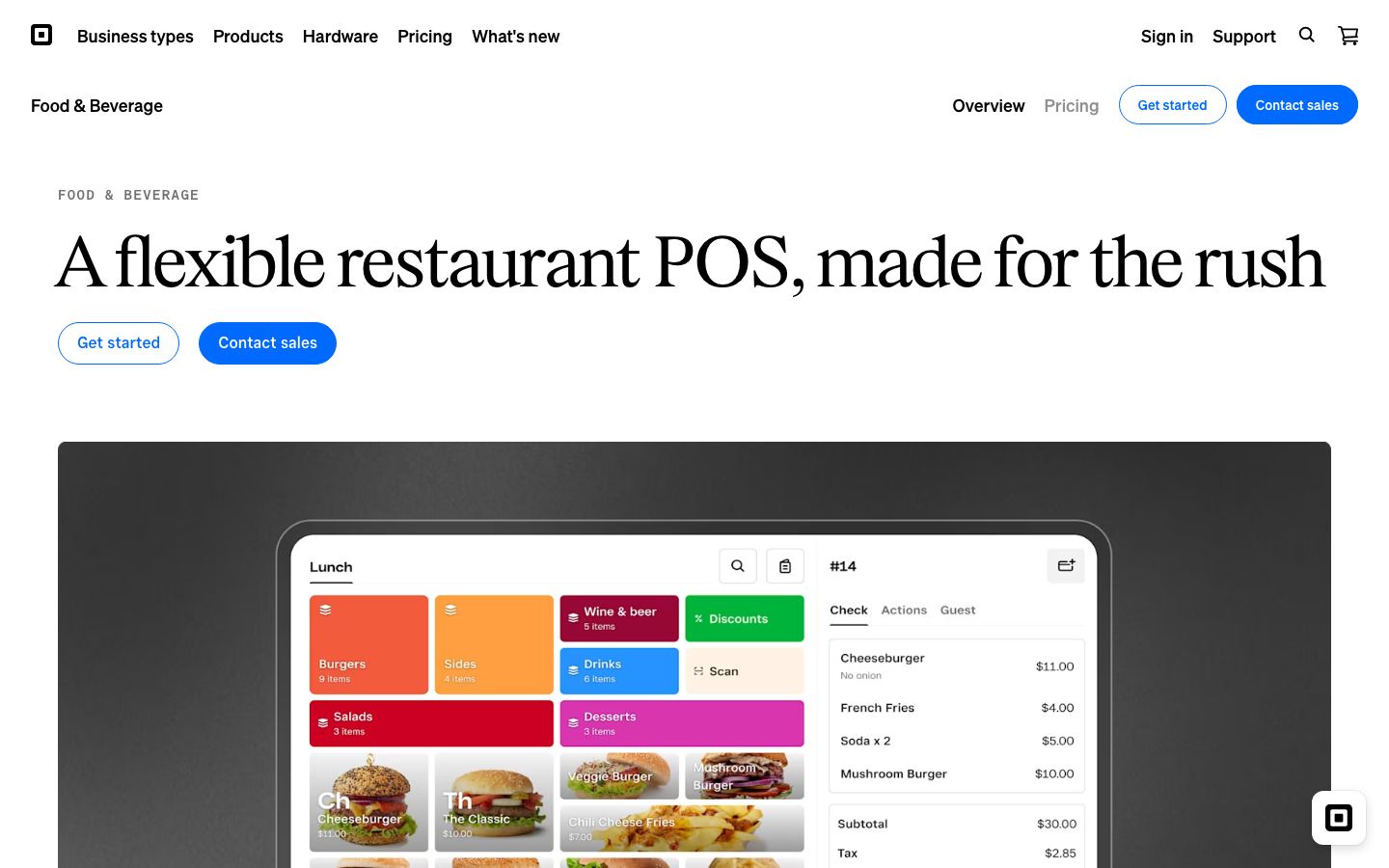
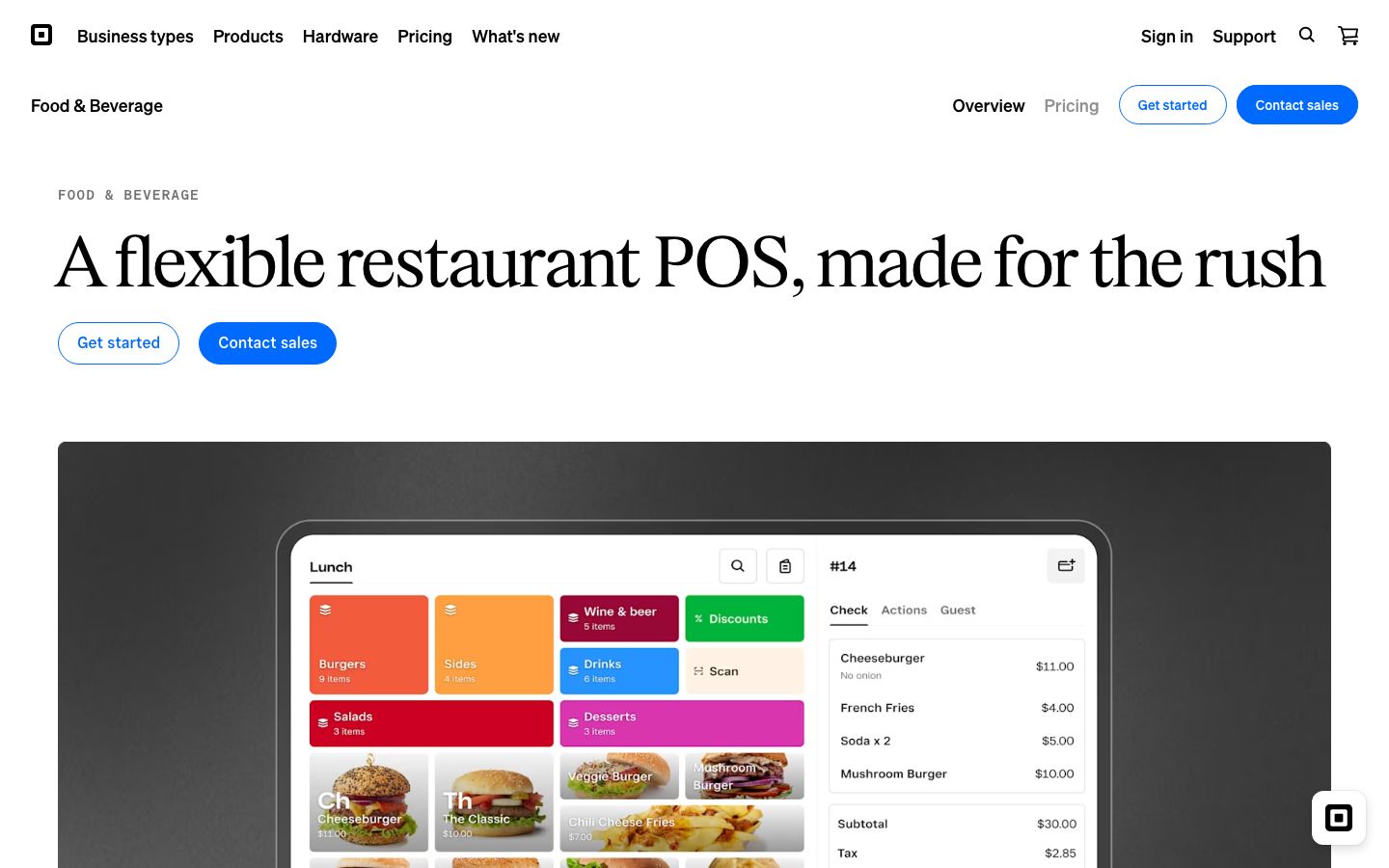
The register runs on an off-the-shelf iPad plus Square's own hardware line — Square Stand, Register, Terminal, Handheld, and Kiosk — so a server takes orders at the counter or tableside without a proprietary locked terminal. Payments cover automatic gratuity (a flat percentage or party-size thresholds), service charges, and QR-code payments printed on the receipt so a guest can pay from their phone.
Coursing and seat management #
On the Premium plan, Square adds seat-level ordering and coursing — the full-service essentials that let a server fire appetizers, hold entrées, and keep each guest's items on the right check. On the Free and Plus plans you get item and menu management but not the seat-and-course layer, which is the main reason a full-service floor moves up to Premium.
Kitchen display and kiosk #
Orders route from the register to the Square KDS app so the line cooks the tickets instead of the expo juggling paper, and the Square Kiosk app lets guests self-order at a fast-casual counter. Both are per-device add-ons rather than base-plan features — budget them per screen (see Pricing).
Online ordering and delivery #
Every plan includes a branded online ordering page with pickup and local delivery. The Orders tab consolidates on-premise and online tickets — including delivery-partner orders from DoorDash — into one queue, so a single screen shows dine-in, pickup, and delivery by status and source instead of a wall of tablets. Order-ready texts fire an SMS to the guest when their order is up.
Inventory, menu, and food costs #
Item and menu management ships on all plans; integrated inventory tracking and close-of-day reports land on Plus and above. For deeper back-of-house control, Square integrates MarketMan as a paid add-on ($99/month per location) to pull purchasing and recipe-level food-cost tracking on top of the POS.
Customers, staff, and banking #
Loyalty programs, a customer directory, gift cards, and marketing tie repeat-visit data back to the check. The Shifts, Payroll, and Team tools handle scheduling and permissions, and Square's embedded banking — Square Checking, instant payouts, loans — lets the day's sales land in an operating account minutes after close rather than days later.
Pricing #
Square publishes its restaurant pricing openly — a real advantage in a category full of quote-only POS. Software fees are charged per location, and the food-and-beverage feature set is included in every plan. Figures below are verbatim from the live US pricing page.
| Plan | Software fee | In-person processing (tap/dip/swipe) | Notable included |
|---|---|---|---|
| Free | $0/mo per location | 2.6% + 15¢ | Item & menu management, pickup & local delivery, branded online ordering page |
| Plus | $49/mo per location | 2.5% + 15¢ | Integrated inventory tracking, close-of-day reports; +$30/mo Square KDS per device, +$50/mo Square Kiosk per device |
| Premium | $149/mo per location | 2.4% + 15¢ | Coursing & seat management; +$20/mo Square KDS per device, +$30/mo Square Kiosk per device |
| Square Pro | Custom (talk to sales) | Custom rates | For operators processing over $250,000/year; hardware discounts, onboarding, dedicated account management |
Two pricing facts to plan around. Keyed or card-on-file transactions (card typed in manually or a saved card) run 3.5% + 15¢ across all three published plans — higher than the tap/dip/swipe rate, so phone and account-billing orders cost more. And KDS and Kiosk are per-device add-ons, not base-plan inclusions: a Plus kitchen with two KDS screens adds $60/month on top of the $49 software fee.
On contracts and hardware, Square is deliberately low-commitment. It's month-to-month with no long-term contract — a clear switching-in advantage over contract-locked systems like Toast or Aloha. The trade-off is the processor lock-in: Square requires you to process payments through Square Payments, which is how the published rates monetize. You can't bring an outside processor the way you can on a processor-agnostic POS.
Who It's For (and Who It Isn't) #
Good fit: cafés, coffee shops, food trucks, bakeries, and single-location quick-service or fast-casual operators who want to open on the Free plan, take card payments at a flat published rate, and skip a sales call and a multi-year contract. Full-service restaurants that value transparent pricing can run Premium for coursing and seat management, and multi-location groups processing heavy volume can negotiate Square Pro.
Weaker fit: a high-volume full-service or multi-unit operation that lives on deep, configurable reporting and cross-location roll-ups — Square's reporting is shallower than restaurant-native competitors, and multi-location permission and data controls are thinner. Operators who want to keep their own card processor are out from the start, since Square only runs on Square Payments. Those buyers should weigh a restaurant-native or processor-agnostic POS instead.
Is It Legit and Worth It? #
Square is a product of Block, Inc., a public company with one of the largest payment-processing footprints in US small business, so there's no vendor-stability question here. Square for Restaurants earns a solid 4.4 from 54 Capterra reviews (the closest Square restaurant listing — Square's generic Point of Sale page shows 4.6 from over 1,200 G2 reviews, but that spans all Square sellers, not restaurants specifically). The dominant praise is consistent: ease of use, the breadth of the Square ecosystem, and flat, transparent pricing.
The recurring complaints are worth pricing in before you commit. Operators find the reporting less deep and less configurable than restaurant-native systems, and the workflows more rigid — some features feel locked to Square's way of doing things, with multi-location permission and data controls flagged as thin. Customer and technical support draws criticism, and reviewers note occasional bugs and some hardware constraints. None of these sink Square for a café or a single-site QSR, where the Free plan and flat rates are hard to beat — but a reporting-heavy full-service group should test Square's reports against its actual month-end workflow before switching.
Alternatives #
- Toast — the all-in-one restaurant-native platform with deeper back-office and reporting, but a multi-year contract and its own hardware and processing.
- TouchBistro — iPad POS built for full-service floors that want restaurant-native coursing without Square's ecosystem breadth.
- Clover — another POS-plus-payments system with an app marketplace, often cross-shopped with Square by small operators.
- SpotOn — restaurant POS with competitive processing and hands-on support, pitched at full service.
- Compare the field in our restaurant POS software guide.
Login & Support #
Restaurants manage the back office through the Square Dashboard at squareup.com (the "Log in" link in the site header), while the Square for Restaurants app runs on the iPad or Square hardware on the floor. Support comes through Square's Help Center, phone, and messaging; the Square Pro tier adds onboarding, technical specialists, and dedicated account management for higher-volume operators.
Estimate your Square for Restaurants cost
Uses published $0.00/mo starting rate. Updates as you type.
Estimator uses vendor-published list rates as anchor. Actual quotes vary by add-ons (member reporting, class scheduling, payment data feeds, active members tier) — request a written quote before signing.
Book a Square for Restaurants demo
Vendor-facilitated. We forward your request to their sales team within 24 hours.
- Choose a preferred date + time slot
- 30-minute product walkthrough
- Custom pricing based on your seat count
Screenshots
Pros
- Genuine $0/month Free plan — the lowest-risk way for a café, food truck, or new QSR to start taking orders
- Flat, published processing rates (2.6% + 15¢ down to 2.4% + 15¢) with no quote call required
- Month-to-month with no long-term contract — easy to try and easy to leave
- Runs on off-the-shelf iPad plus Square hardware, not a proprietary locked terminal
- Orders tab consolidates dine-in, pickup, and DoorDash delivery tickets into one queue
- Plugs into the wider Square ecosystem: payments, instant payouts, banking, payroll, and loyalty under one login
Cons
- Reporting is shallower and less configurable than restaurant-native competitors
- Rigid workflows and limited customization; some features feel locked to Square's way
- Multi-location permission and data controls are thinner than enterprise restaurant systems
- You must process every card through Square Payments — no bringing your own processor
- Customer and technical support cited as a recurring weak point by reviewers
- Occasional bugs and some hardware constraints reported by operators
Frequently Asked Questions
Similar Restaurant POS Software Tools
User Reviews
Write a reviewNo reviews yet for Square for Restaurants.
Be the first to review