The best POS systems for small and independent restaurants in 2026, ranked by fit with real prices, processing rates and honest cons: Square, TouchBistro, Toast, SpotOn, Rezku, Lightspeed.
Best POS system for a small restaurant in 2026
The best POS systems for small and independent restaurants in 2026, ranked by fit with real prices, processing rates and honest cons: Square, TouchBistro, Toast, SpotOn, Rezku, Lightspeed.

For this guide we tested and reviewed the platforms hands-on wherever a trial or demo was available, and verified each price against the vendor's own pricing page before publishing.
Which point-of-sale fits a small, independent restaurant — ranked by fit, with real pricing, processing rates, and the one honest caveat on each.

Toast
Pros
- Genuinely all-in-one: POS, payments, online ordering, payroll, loyalty, and inventory under one vendor
- Restaurant-native workflows — coursing, modifiers, tips, and KDS routing built in, not bolted on
- Ease of use for both staff and guests is the dominant praise across reviews
- Offline mode keeps orders, tickets, and card payments running through a network drop
- Deep digital stack: branded app, QR order-and-pay, and DoorDash/Uber Eats/Grubhub consolidation
- 24/7/365 Toast Care support included in every subscription
Cons
- You must process card payments through Toast — no bringing your own processor
- Runs only on Toast's proprietary hardware, not off-the-shelf iPads or Android tablets
- Reviewers want easier open-API integrations and deeper, configurable reporting
- Multi-location operators cite permission and data-handling limits across locations
- Contract terms and the sales process draw recurring friction; read the merchant agreement
- Intermittent bugs and occasional downtime reported by some operators
At a glance
- Pricing
- Paid
- From
- $0.00/mo
- Free trial
- No
- Best for
- Smb, Mid Market, Enterprise

TouchBistro
Pros
- Restaurant-native iPad POS — tableside ordering, floor plans, coursing, and modifiers built for dining rooms, not retail
- Low $69/month entry for the core POS, with no POS features locked out of the base plan
- Processor-flexible — works with a range of payment processors instead of forcing one in-house rate
- Commission-free own-brand online ordering, unlike third-party delivery marketplaces
- Ease of use is the dominant praise across reviews; 24/7 phone and email support included
- Broad add-on stack: KDS, inventory, labor, loyalty, reservations, gift cards under one vendor
Cons
- Reporting depth is the #1 complaint — daily/EOM reports miss comps, promos, and dine-in vs takeout splits
- The all-in-one modules (KDS, inventory, online ordering, loyalty) are quote-only add-ons above the $69 headline
- Contract and billing friction, including reports of continued charges after cancellation
- Post-sale support reachability draws recurring complaints (even as support-when-reached is praised)
- Updates that interrupt during service and occasional downtime reported by some operators
- Payment-processing friction reported by some users; the processing rate is quote-only
At a glance
- Pricing
- Paid
- From
- $69.00/mo
- Free trial
- No
- Best for
- Smb, Mid Market
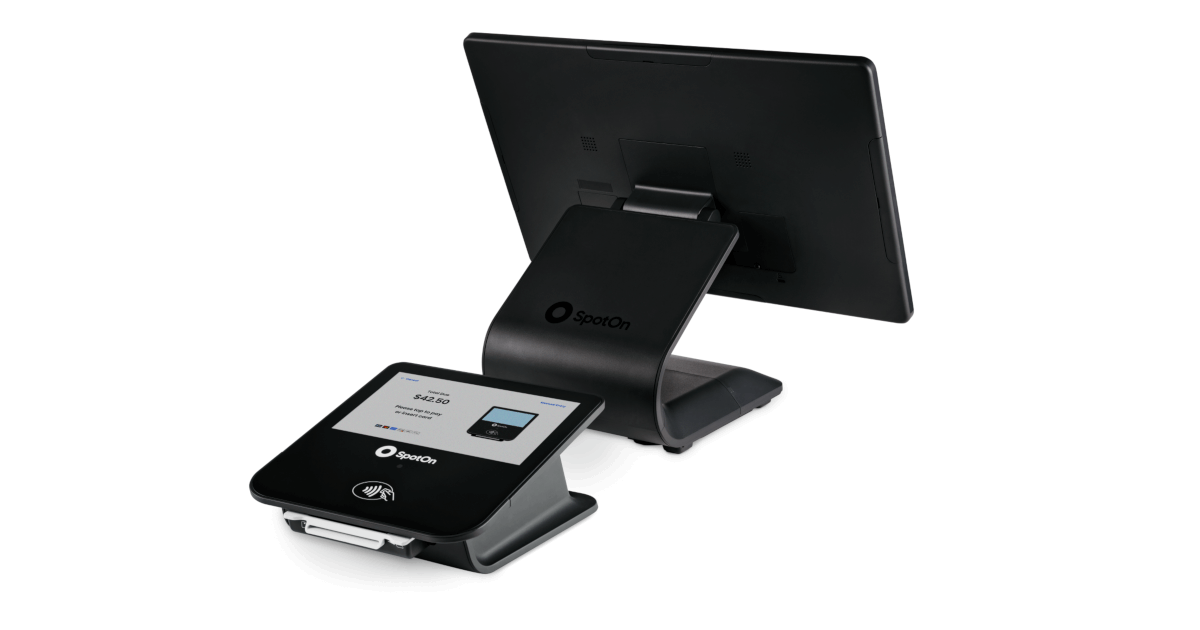
SpotOn
Pros
- 24/7 support from real humans is the dominant praise — the biggest differentiator in this niche
- Genuinely all-in-one: POS, payments, online ordering, reservations, loyalty, labor, and kiosks under one vendor
- Competitive card rates on Essentials (2.45% + $0.15) with month-to-month flexibility
- All-In plan includes POS hardware at $0/station/month for single independent restaurants
- SpotOn Order is commission-free first-party online ordering, keeping direct orders off marketplace tablets
- Restaurant-native across segments — full service, bars, fast casual, and multi-unit groups
Cons
- You must process card payments through SpotOn — no bringing your own processor
- Runs only on SpotOn's proprietary hardware, not off-the-shelf iPads or Android tablets
- Cost and layered fees are a recurring complaint; the $0 All-In plan carries a 2-year minimum term
- Freezes and lost tickets reported under heavy service load; offline-mode reliability flagged as a gap
- Some operators want deeper, more configurable reporting and cleaner multi-location report roll-ups
- Turnaround on bug fixes and feature requests can lag despite responsive first-line support
At a glance
- Pricing
- Paid
- From
- $0.00/station/mo
- Free trial
- No
- Best for
- Smb, Mid Market, Enterprise

Lightspeed Restaurant
Pros
- Runs on off-the-shelf iPads, not proprietary terminals — no hardware lock-in
- Transparent published software pricing in four tiers ($69/$189/$399/quote)
- Advanced Insights reporting, Benchmarks & Trends, and Lightspeed AI are the dominant praise
- Built for multi-location and hotel F&B with multiple revenue-center support and PMS integration
- Deep feature set: floor plans, service-pacing (Tempo), QR order-and-pay, pre-auth bar mode
- Named integrations for scheduling (7shifts) and reservations (OpenTable), plus Tap to Pay
Cons
- Customer support is the recurring complaint despite 24/7 marketing — reaching the right person is the friction
- Add-ons stack the real cost: KDS is $30/screen/mo, and reservations, full inventory, and delivery each cost extra
- Learning curve and onboarding/setup draw criticism from reviewers
- No published flat processing rate — Lightspeed Payments is quoted per account, not posted
- Occasional bugs and glitches reported by some operators
- Heavier than flat-rate apps for a single food truck or one simple quick-service counter
At a glance
- Pricing
- Paid
- From
- $69.00/mo
- Free trial
- No
- Best for
- Smb, Mid Market, Enterprise

Square for Restaurants
Pros
- Genuine $0/month Free plan — the lowest-risk way for a café, food truck, or new QSR to start taking orders
- Flat, published processing rates (2.6% + 15¢ down to 2.4% + 15¢) with no quote call required
- Month-to-month with no long-term contract — easy to try and easy to leave
- Runs on off-the-shelf iPad plus Square hardware, not a proprietary locked terminal
- Orders tab consolidates dine-in, pickup, and DoorDash delivery tickets into one queue
- Plugs into the wider Square ecosystem: payments, instant payouts, banking, payroll, and loyalty under one login
Cons
- Reporting is shallower and less configurable than restaurant-native competitors
- Rigid workflows and limited customization; some features feel locked to Square's way
- Multi-location permission and data controls are thinner than enterprise restaurant systems
- You must process every card through Square Payments — no bringing your own processor
- Customer and technical support cited as a recurring weak point by reviewers
- Occasional bugs and some hardware constraints reported by operators
At a glance
- Pricing
- Freemium
- From
- $0.00/mo
- Free trial
- Yes
- Best for
- Freelancer, Smb, Mid Market, Enterprise

Rezku
Pros
- Flat, published software pricing ($99–$299/mo) in a niche that mostly hides behind quotes
- Customer support is the dominant praise across reviews — 24/7, U.S.-based, no extra charge
- Unlimited 1:1 training, menu building, and in-house support included in every tier
- Genuine all-in-one: POS, KDS, online ordering, loyalty, inventory, and employee management in one login
- Offline mode keeps terminals ringing sales and printing tickets through an internet drop
- Bar/brewery-friendly with pour-monitoring hardware integrations most POS vendors skip
Cons
- Reporting depth is the top reviewer complaint — operators want more configurable reports than the base product gives
- Hardware cost and constraints come up as a friction point in reviews
- Some reviewers flag price and fees relative to expectations
- Card processing runs through a third-party processor at a rate quoted per merchant — no published rate, no bring-your-own processor
- Implementation is billed separately from the software subscription
- Third-party review base is modest (42 on Capterra), so the score reflects a satisfied core rather than a high-volume consensus
At a glance
- Pricing
- Paid
- From
- $99.00/mo
- Free trial
- Yes
- Best for
- Smb, Mid Market
For a small or independent restaurant, the honest default is Square for Restaurants — a genuinely free POS tier with flat 2.6% + 15¢ in-person card rates and no contract — unless you run a full-service floor, in which case TouchBistro ($69/month, iPad, tableside ordering and coursing) or Toast (one vendor for front-of-house, kitchen and payroll) earns the premium. Below are six systems we rate for independents, each with the segment it actually fits, real pricing, and the one caveat that bites.
What a small restaurant actually needs from a POS #
A single-location operator is not buying feature count; you are buying the few operations you repeat every shift. You need to take orders on the floor or at a counter and fire them to the line, 86 an item the second it runs out so it drops off every screen, count ingredient-level inventory to defend a 2–6% net margin, and close out cleanly at the end of the night — a Z-report that reconciles cash against sales without a spreadsheet. On a food truck or a weak-signal site, offline mode is non-negotiable: the terminal has to keep ringing sales and taking cards when the internet drops. Everything else — reservations, loyalty, a kitchen display — is worth paying for only once your volume asks for it. Two numbers decide the monthly bill more than any feature: your effective processing rate (total card fees divided by card volume, not the teaser rate a rep quotes) and your total cost of ownership (software + hardware + processing + add-ons + any early-termination fee).
The shortlist #
1. Square for Restaurants — best for new, budget, and single-location spots #
Square is the one system here with a real $0/month plan, and for a café, food truck, or single-location quick-service spot that is the whole point. In-person cards run a flat 2.6% + 15¢ on the Free plan (2.5% + 15¢ on the $49 Plus tier, 2.4% + 15¢ on the $149 Premium tier), keyed or card-on-file is 3.5% + 15¢, and billing is month-to-month with no long-term contract — a real switching-in advantage over contract-locked rivals. It runs on an off-the-shelf iPad plus Square's own readers and stands, so you are not buying a locked proprietary terminal, and the Orders tab pulls DoorDash and your branded online orders onto one screen. Kitchen display and kiosk are per-device add-ons ($20–$50/month), not part of the base plan.
Caveat: you process through Square Payments — there is no bringing your own processor — and reviewers consistently find the reporting shallower and less configurable than restaurant-native competitors.
2. TouchBistro — best for full-service independents that live on the floor #
TouchBistro is iPad-native and built around table service: tableside ordering, floor-plan and table management, menu management, and staff permissions all sit inside the $69/month POS plan, with 24/7 support included. Unlike Square or Toast, it is processor-flexible — run an integrated processor or bring a compatible one — and it charges no commission on its own online ordering. The Essentials bundle at $119/month folds in payments and restaurant-grade hardware.
Caveat: reporting depth is the single most common complaint in its reviews — daily and end-of-month reports are reported to miss comps, promos, voids, and dine-in-versus-takeout splits — and a fully loaded stack (KDS, inventory, online ordering, loyalty) is quote-only and lands well above the $69 headline.
3. Toast — best for one vendor across front-of-house, kitchen and payroll #
Toast is the all-in-one that independents grow into: POS, payments, kitchen display, online ordering, loyalty, scheduling, tips, payroll, and xtraCHEF cost analytics under one login, with an offline mode that keeps tickets printing and cards processing through an outage. Software starts at $0/month on the Pay-as-You-Go plan; the real spend is hardware, implementation, per-device subscriptions, and a blended flat processing rate quoted per merchant, with 0% financing offered by application. Toast Care support is 24/7/365.
Caveat: you are locked to Toast's own proprietary Android hardware and Toast processing — no outside processor, no off-the-shelf tablets — and reviewers cite long-term contracts and sales-process friction.
4. SpotOn — best when support is your deciding factor #
Support is SpotOn's most-praised trait in its reviews, backed by 24/7/365 help at no extra cost on every plan. There are two honest ways in: the All-In plan at $0/station/month with hardware included (2.79% + $0.20 card-present) but a two-year minimum term, or POS Essentials at $55/station/month, month-to-month, with cheaper 2.45% + $0.15 processing and hardware bought outright (Station 15 at $750, handhelds at $297). It is a full stack — POS, KDS, kiosks, commission-free online ordering, reservations, loyalty, and labor.
Caveat: you must use SpotOn's proprietary hardware and SpotOn processing — "can I use my own tablets? No" is stated plainly — and some operators report freezes or lost tickets under heavy volume.
5. Rezku — best for a flat, predictable software bill with hands-on onboarding #
Rezku prices software flat — $99/month for up to three stations, $199 for four to seven, $299 for unlimited — and includes unlimited U.S.-based support, unlimited menu building, and unlimited one-on-one training at every tier, which is rare at this price. It runs on iPad with an industry-leading offline mode, built-in KDS, ingredient-level inventory, loyalty, and QR and kiosk ordering, and it integrates with QuickBooks, Xero, DoorDash, Uber Eats, Grubhub and 7shifts.
Caveat: card processing is quoted privately through a third-party processor (no published rate), and the third-party review base is small — Capterra 4.7 across 42 reviews — so the score is genuine but not high-volume.
6. Lightspeed Restaurant — best for data-minded independents planning to grow #
If you want to read your numbers, Lightspeed's reporting is its strongest card: Advanced Insights, benchmarks and trends, and a natural-language AI layer that answers performance questions, on an iPad POS starting at $69/month. It is built for full-service, bars, cafés and hotels and scales cleanly to multi-location when you add a second site.
Caveat: the Starter tier excludes reservations, full inventory, delivery integrations, and KDS ($30/screen/month), so a working stack climbs quickly — and despite the 24/7 marketing, support is the top complaint in its own reviews.
At-a-glance comparison #
| POS | Entry price | Best for | Rating |
|---|---|---|---|
| Square for Restaurants | $0/mo (free plan) | New, budget, single-location, food truck | 4.4 |
| TouchBistro | $69/mo (POS) | Full-service independents | 3.8 |
| Toast | $0 software + hardware/processing | One vendor for FOH, BOH, payroll | 4.1 |
| SpotOn | $0/station (2-yr) or $55/station | Support-first operators | 4.2 |
| Rezku | $99/mo (≤3 stations) | A flat, predictable software bill | 4.7 |
| Lightspeed Restaurant | $69/mo (Starter) | Data-minded, growth-minded operators | 4.4 |
How we picked #
We shortlisted POS systems an independent operator can actually run at one or two locations, then ranked on fit rather than brand. Every price, processing rate, and contract term above comes from the vendor's own live pricing page; every rating is a real third-party aggregate (Capterra, with G2 as a cross-check), and where a vendor has no honest sample we leave the score off rather than invent one. The cons come from each vendor's own reviews, matched per vendor, never a blanket complaint. The ranking favors a small restaurant's realities — a low or flat entry price, no-contract or short-term flexibility, offline mode, and support you can reach during service — which is why Square leads for most new rooms while a busy full-service floor tilts toward TouchBistro or Toast. Before you sign, get the effective processing rate, contract length, auto-renew, and early-termination fee in writing, and compare total cost of ownership, not the sticker monthly. For the full field, see the restaurant POS software pillar.
Frequently Asked Questions
For most small and independent restaurants, Square for Restaurants is the honest default — a free plan, flat 2.6% + 15¢ in-person card rates, and no contract. Full-service floors that need tableside ordering and coursing tend to prefer TouchBistro ($69/month) or Toast's all-in-one, and support-first operators pick SpotOn.
Square and Toast both start at $0/month for software, and SpotOn's All-In plan is $0/station/month with hardware included (but a two-year minimum term). "Free" software is monetized through card processing, so compare the effective processing rate and total cost of ownership, not the sticker.
Square is month-to-month with no long-term contract, and SpotOn's Essentials tier is month-to-month; SpotOn's $0 All-In plan requires a two-year minimum, and Toast reviewers cite long-term contracts. Always get contract length, auto-renew, and any early-termination fee in writing before you sign.
TouchBistro, Square, Rezku and Lightspeed run on iPad; TouchBistro is processor-flexible, while Square and Toast lock you to their own processing. Toast and SpotOn require their own proprietary hardware. If keeping your processor or reusing tablets matters, shortlist TouchBistro.
Budget software + hardware + processing + add-ons. Published software here runs $0–$149/month; restaurant hardware is roughly $300–$2,000 per terminal; in-person card processing sits around 2.4–2.8% + $0.10–0.20. KDS, reservations and inventory are frequently paid add-ons. Your effective rate (fees ÷ volume) drives the monthly bill more than the software fee.
Not always — a single-printer line can run on tickets. A KDS earns its keep once you have multiple stations or heavy takeout and delivery to route. On most systems here it is a paid add-on (Square $20–$50/device, Lightspeed $30/screen), so price it into the stack rather than assuming it is included.