
For this guide we tested and reviewed the platforms hands-on wherever a trial or demo was available, and verified each price against the vendor's own pricing page before publishing.
Sling is a staff-scheduling and labor-cost tool for shift-based restaurants — not a point-of-sale system — and it earns its keep by building schedules fast, tracking clock-ins, and showing labor as a percent of sales once you connect a POS. There's a genuinely free tier for up to 30 users, which makes it a safe first scheduling tool for a single café or bar; paid plans add time tracking and reporting for operators who want tighter labor control. The catch worth knowing up front: it's now branded "Sling by Toast," so it's most natural if you already run Toast POS and Toast Payroll.
To be clear about what Sling is and isn't: it handles schedules, time clocks, and team messaging. It does not take orders, run a kitchen display, process payments, or manage inventory — pair it with a POS for that.
What Is Sling #
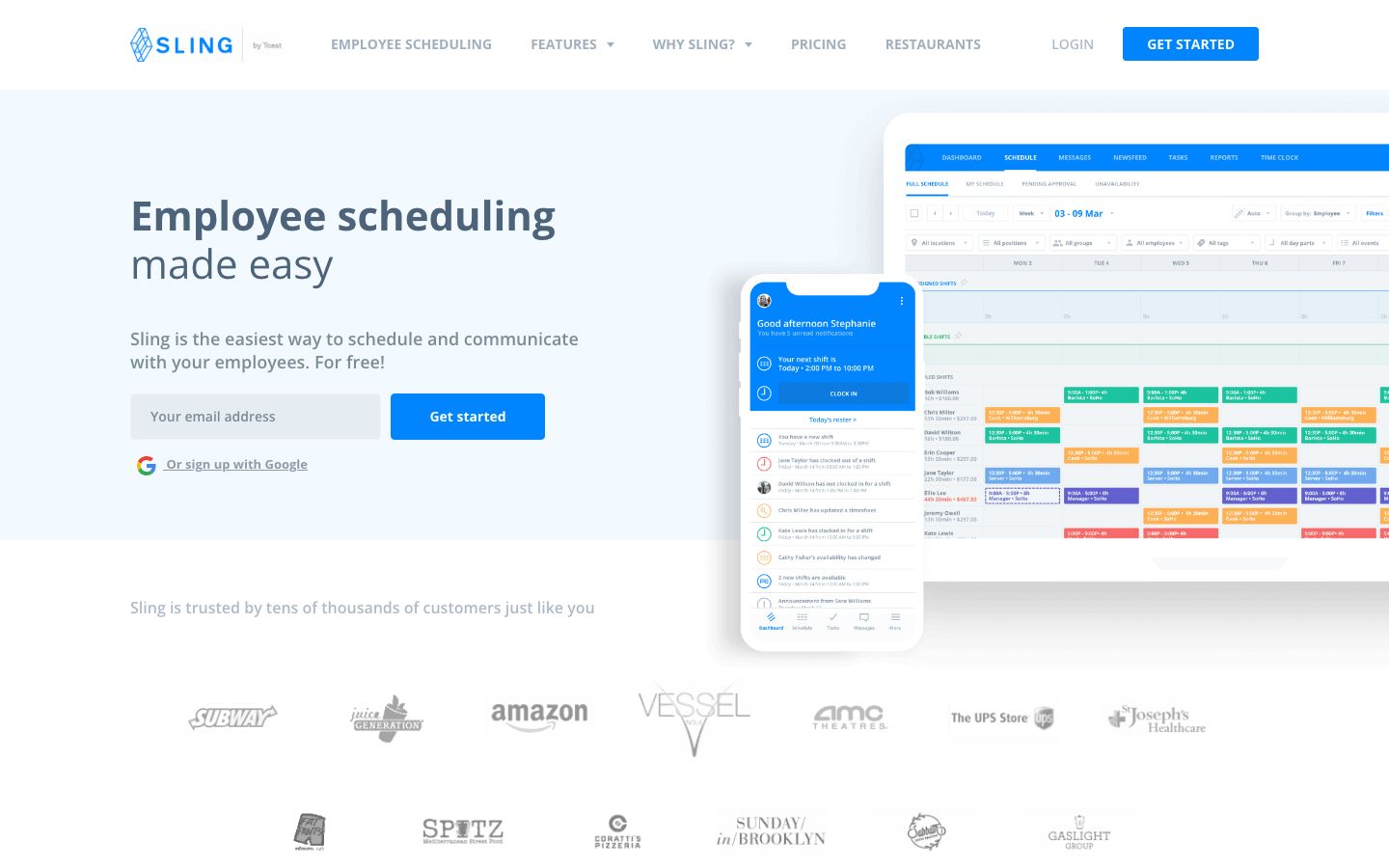
Sling is a cloud-based employee scheduling, time-tracking, and team-communication platform for shift-based teams. A manager builds the week's schedule, employees see their shifts and swap them, the time clock records hours, and the labor dashboard compares what you scheduled against what you actually spent. It runs in a browser and on iOS and Android apps — no proprietary hardware — with a shared-device kiosk mode for clock-in and clock-out on the Business tier.
The product is now branded Sling by Toast: a persistent banner across getsling.com routes Toast customers to view plans in Toast Shop, and the first-class integration exports timesheets straight to Toast Payroll. Sling was originally built as a standalone product by Sling, Inc.; standalone signup still exists, but the center of gravity has shifted toward Toast's ecosystem.
For restaurants, Sling sits beside the POS as the labor layer. It markets to full-service and quick-service operators, bars, cafés, and multi-location and franchise groups — its own customer stories name bar, café, and fine-dining operators. A single small restaurant can run the free tier; a franchise with locations across town uses the paid tiers for time tracking, overtime control, and reporting.
Features #
Shift scheduling #
The core is schedule-building: shift templates, shift alarms and reminders, long-term scheduling so a manager can lay out weeks ahead, and shift offers where an employee hands an open shift to a coworker for approval. This is the module reviewers praise most — building and publishing a schedule is fast.
Availability and time off #
Employees set their availability and request time off; a manager approves or denies it against the schedule. The Business tier adds sick call-out tracking, no-show tracking, and PTO management, so the gaps that wreck a Friday-night line are visible before service, not during it.
Time clock and time tracking #
Premium adds mobile time tracking; Business adds kiosk time tracking on a shared device plus overtime tracking. Hours flow into timesheets a manager can review and export for payroll instead of re-keying a punch clock.
Labor-cost management #
Connect a POS and Sling compares scheduled labor against actual sales, showing labor as a percent of revenue — the number an operator watches to protect margin. The Business tier reports total hours worked and wages earned so a manager can see where the week's labor budget went.
Team communication #
A newsfeed carries announcements and targeted pages; messaging runs private on the free tier and private-plus-group on Premium. Task management lets a manager assign work per shift or per employee. The point is one channel for the team instead of a group text that scrolls away.
Pricing #
Sling prices in USD, per user per month, with a monthly or annual toggle (annual bills yearly and saves about 15%) and a 15-day free trial on the paid tiers.
| Plan | Monthly | Annual (billed yearly) | What it adds |
|---|---|---|---|
| Free (up to 30 users) | $0 | $0 | Shift scheduling, time-off requests, open/available shifts, newsfeed, long-term scheduling, private messaging |
| Premium | $2.00 / user / mo | $1.70 / user / mo | Mobile time tracking, labor-cost management, overtime tracking, group messaging, calendar sync |
| Business (recommended) | $4.00 / user / mo | $3.40 / user / mo | Kiosk time tracking, reports, no-show and sick-call-out tracking, PTO management |
Because Sling is scheduling software, there is no card-processing cut and no processing rate — that's a POS concern, not Sling's. There's no proprietary hardware to buy: it runs in a browser and on the mobile apps, and kiosk mode uses a device you already own. The free tier is genuinely free for up to 30 users; paid plans bill monthly or annually with no long-term-contract requirement stated on the pricing page. Volume or enterprise pricing for very large teams is sold by quote rather than published.
Who It's For (and Who It Isn't) #
Good fit: a shift-based restaurant that needs to build schedules fast and watch labor cost. A single café or bar can run the free tier for up to 30 staff and never pay. A full-service restaurant, quick-service operator, or multi-location franchise that wants time tracking, overtime control, and labor-as-a-percent-of-sales reporting steps up to Premium or Business. It's an especially natural pick if you already run Toast POS and Toast Payroll, since employee data, POS sales, and timesheet export all connect.
Weaker fit: an operator who wants one vendor for everything — Sling is scheduling only, so you still need a POS and, usually, a separate payroll provider. A restaurant on a POS with strong built-in scheduling (Toast's Team suite, Restaurant365, SpotOn) may not need a second tool at all. And a very large team should price the per-user math carefully, because $2–$4 per user per month adds up across dozens of staff.
Is It Legit and Worth It? #
Sling is a real, well-reviewed scheduling product — Capterra 4.6 from 212 reviews, G2 4.4 from 88 — now backed by Toast. The consistent praise is for scheduling itself, overall ease of use, and the value of a free tier most competitors don't match. For a restaurant that mainly needs to publish schedules and keep labor in check, it does the core job well.
The honest cons, from operator reviews: the step up to paid tiers (and the per-user cost at scale for a big team) is a recurring gripe. Some users describe a learning curve before they're fully comfortable with it. The mobile experience draws repeated complaints — a common theme across scheduling apps generally. And operators hit limits customizing workflows and views to exactly how their restaurant runs. None of these are dealbreakers for most shift-based teams, but weigh the mobile reviews if your staff will live in the app, and run the per-user cost against your headcount before committing.
Alternatives #
Sling's direct rivals are other standalone scheduling apps — 7shifts, When I Work, Deputy, HotSchedules — which operators weigh on mobile UX, free tiers, and restaurant-specific features. Within this catalog, the realistic alternatives are systems whose built-in scheduling can replace a separate tool:
- Toast — the parent brand; its Team suite handles scheduling and tips inside the POS, so Toast restaurants may not need Sling as a second login.
- Restaurant365 — all-in-one restaurant management with scheduling, payroll, and accounting together, aimed at multi-unit operators.
- SpotOn — restaurant POS with labor and scheduling built into the platform for operators who want fewer vendors.
- Compare the field in our restaurant employee scheduling software guide.
Login & Support #
Managers and staff log in through the "Login" link in the top navigation at getsling.com, or through the iOS and Android apps for day-to-day shift viewing and clock-in. Support resources on the site include FAQs, a blog, customer stories, and a security page; published support hours and channel SLAs aren't listed, though reviewers single out Sling's support as personal and responsive.
Estimate your Sling cost
Uses published $2.00/user/mo starting rate. Updates as you type.
Estimator uses vendor-published list rates as anchor. Actual quotes vary by add-ons (member reporting, class scheduling, payment data feeds, active members tier) — request a written quote before signing.
Book a Sling demo
Vendor-facilitated. We forward your request to their sales team within 24 hours.
- Choose a preferred date + time slot
- 30-minute product walkthrough
- Custom pricing based on your seat count
Screenshots
Pros
- Genuinely free tier for up to 30 users — rare among restaurant scheduling tools
- Fast, flexible schedule-building with templates, shift offers, and long-term scheduling
- Labor-cost dashboard shows scheduling against actual sales once a POS is connected
- Runs in a browser and on iOS/Android with kiosk clock-in — no proprietary hardware
- First-class Toast and Toast Payroll integration for timesheet export and sales-vs-labor
- Overall ease of use is the dominant praise across reviews
Cons
- Scheduling only — not a POS, so you still need a separate point-of-sale and usually payroll
- Per-user cost ($2–$4/user/mo) adds up for large teams, and the step to paid tiers is a common gripe
- Mobile app draws recurring complaints from reviewers
- Some users report a learning curve before they are fully comfortable with it
- Limits on customizing workflows and views to a restaurant's exact needs
Frequently Asked Questions
Similar Restaurant Employee Scheduling Software Tools
User Reviews
Write a reviewNo reviews yet for Sling.
Be the first to review